Overview
When a Webex Calling call ends, Cisco tags the call record with a "call outcome" (Success, Failure, or Refusal) and a more specific "outcome reason" such as UserBusy, NoRouteToDestination, or AdminCallBlock. VoIP Detective allows you to configure alerts, so that you will be notified by email when calls matching your criteria exceed a threshold that you configure.
Beyond the outcome and reason, Webex alerts can also filter by phone number and by call duration - which makes them useful for catching problems that traditional error monitoring misses, such as failing fax lines (see the example below).
How alerts work
Once per hour, VoIP Detective evaluates a one-hour window of imported Webex call records against each alert you have configured. The window ends 15 minutes before the top of the hour: for example, the check that runs at 2:00 PM examines calls from 12:45 PM to 1:45 PM. This small delay exists because Cisco makes Webex call records available several minutes after a call completes - evaluating right up to the current moment would permanently miss calls from the end of each hour. The alert email always shows the exact time period that was examined.
If the number of matching calls meets or exceeds your alert threshold, an email is sent to the address on the alert.
Create a Webex error alert
Administrators can create Webex error alerts by clicking on the Administration dropdown and selecting "Webex Call Error Alerts". Creating alerts requires a VoIP Detective Pro license.
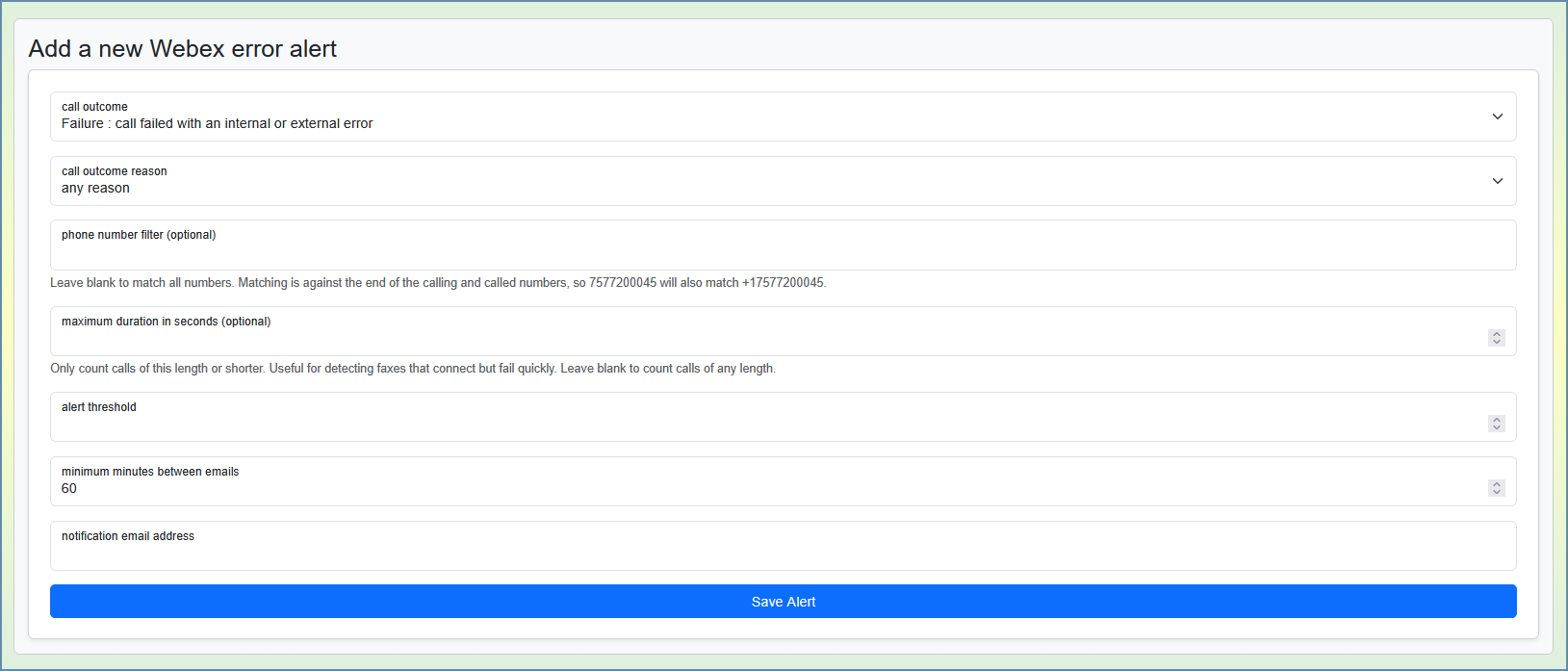
- Call outcome : The Cisco outcome to monitor - Success, Failure, or Refusal.
- Call outcome reason : Optionally narrow the alert to one specific reason. The dropdown only shows reasons that belong to the selected outcome. Leave it on "any reason" to count every call with the selected outcome.
- Phone number filter (optional) : Only count calls where the calling or called number matches. Matching is performed against the end of the number, so entering 7577200045 will also match +17577200045. Leave blank to match all numbers.
- Maximum duration in seconds (optional) : Only count calls of this length or shorter. Leave blank to count calls of any length.
- Alert threshold : The minimum number of matching calls within the one-hour window before an alert is issued.
- Minimum minutes between emails : A cooldown to prevent repeated emails for an ongoing condition. The default of 60 allows at most one email per hour; raise it to 240 to hear about a persistent problem at most every 4 hours. Set it to 0 to disable the cooldown entirely.
- Notification email address : The email destination of the alert.
Example: detecting a failing fax line
Webex call records capture call signaling - whether the call connected and how it ended - but not what happened to the media during the call. A fax transmission that connects successfully and then fails partway through is recorded as a short, successful call. This means fax failures cannot be caught by monitoring the Failure outcome alone.
Instead, use the duration and number filters together. A healthy fax transmission typically lasts a minute or more, while a failing one usually disconnects within seconds. To monitor a fax line at 757-720-0045:
- Call outcome : Success
- Call outcome reason : any reason
- Phone number filter : 7577200045
- Maximum duration : 20
- Alert threshold : 3
This alert fires when three or more calls involving the fax number connect but end within 20 seconds during a single hour - a strong signal that transmissions are failing. Tune the duration and threshold to your fax traffic patterns.
The alert email
The alert email tells you how many matching calls were detected, a description of the conditions the alert monitors, the exact one-hour time period that was examined, your threshold, and the ID of the alert that fired.
Alert history
The bottom of the alerts page shows a history of every alert email this system has sent: when it fired, the conditions it monitors, how many calls matched versus your threshold, the time period examined, and the address it was sent to.

The 100 most recent entries are shown, and the "load more" button retrieves older entries. History entries are kept for 90 days, and are preserved even if the alert that created them is later changed or deleted.
Reference: call outcomes and reasons
These values come directly from Cisco's Webex call detail records. Cisco may add values over time; VoIP Detective will display any new values as reported.
Success - call routed and disconnected successfully
- Normal : call completed successfully
- UserBusy : the user was busy
- NoAnswer : the user did not answer
Refusal - call rejected due to call block or timeout
- CallRejected : the recipient rejected the call
- UnassignedNumber : the dialed number is not assigned to any user or service
- SIP408 : request timed out while trying to locate the user
- InternalRequestTimeout : the service could not fulfill the request in time
- Q850102ServerTimeout : server timed out
- NoUserResponse : no response from the user
- NoAnswerFromUser : no answer from the user
- SIP480 : the caller was unavailable
- SIP487 : the request was terminated by the called number
- TemporarilyUnavailable : the user was temporarily unavailable
- AdminCallBlock : the call was rejected by an administrator call block
- UserCallBlock : the call was rejected by a user call block
- Unreachable : unable to route the call to the destination
Failure - call failed with an internal or external error
- DestinationOutOfOrder : the service request failed (destination out of order)
- SIP501 : invalid method
- SIP503 : service temporarily unavailable
- ProtocolError : unknown release code (protocol error)
- NoRouteToDestination : no route available to the destination
- SIP606 : the session description was not acceptable
- Internal : internal Webex Calling failure
For Cisco's own documentation of these fields, see the Webex Detailed Call History API reference.
Was this article helpful?
That’s Great!
Thank you for your feedback
Sorry! We couldn't be helpful
Thank you for your feedback
Feedback sent
We appreciate your effort and will try to fix the article